Server-Side Tracking & CAPI for Meta Ads: Fix Your Attribution Before You Scale

If your Meta-reported sales are off by more than 10% to 15%, don’t scale yet. Fix tracking first.
I’ve seen the same pattern over and over: brands spend $10,000+/month, trust weak Pixel data, and make budget calls from numbers that don’t match backend sales.
Here’s the short version:
- Pixel-only tracking misses data after iOS changes, Safari limits, and ad blockers
- CAPI fills in missing purchase events by sending data from your server to Meta
- Deduplication matters: Pixel and CAPI need the same
event_idso one order doesn’t count twice - Event Match Quality (EMQ) improves when you send hashed email, hashed phone,
external_id, plus plain-textfbpandfbc - Full server-side tracking adds backend data like order value, CRM status, subscriptions, and offline info
- Your setup is in good shape when Purchase fires on every order, dedup works, EMQ is 6+ at minimum, and Meta stays within 10%–15% of backend sales
Browser-only tracking can miss 20% to 40% of purchases. And after Meta changed attribution windows in January 2026, many brands saw reported conversions drop by 15% to 30%. That means weak tracking doesn’t just hurt reporting. It hurts every spend decision you make.
Quick Comparison
| Setup | What it does | Main issue | Best fit |
|---|---|---|---|
| Pixel only | Tracks browser events | Misses data when browser signals fail | Small tests |
| Pixel + CAPI | Sends events from browser and server | Needs clean dedup setup | Most brands spending on Meta |
| Full server-side | Uses backend and server data for Meta events | More setup work | Brands with CRM, LTV, and subscription data |
Bottom line: if you want to scale Meta ads with confidence, you need clean purchase tracking first, then more spend.
The Problem: Browser-Only Tracking Lies After iOS, Ad Blockers, and Cookie Loss
The Meta Pixel lives in the browser. So when a browser blocks scripts, trims cookies, or strips click data, attribution starts to fall apart. And it rarely breaks in just one spot. Data gets lost at several points along the way.
What the Meta Pixel Does Well and Where It Breaks
The Pixel is good at logging front-end events for people who let it run. If the script loads the way it should, purchase events fire right away. That speed is useful.
But there’s a catch: it only works when the browser cooperates.
ATT limits user-level attribution. Safari ITP can cut cookie life down to 24 hours. iOS 17 and 18 can remove fbclid and UTMs from Safari traffic. Ad blockers can block the Pixel entirely. Put all of that together, and 20% to 40% of purchases may never get credited to Meta when you rely on browser-only tracking.
Once those signals disappear, Meta is working with partial data. That’s the point where CAPI starts to matter.
Why Bad Attribution Is More Dangerous Than Bad Creative
Bad creative can burn cash in one campaign. Bad attribution does more damage than that. It distorts every call you make across the account, which is why many brands opt for professional Meta Ads Management Services.
When the Pixel misses purchases, ROAS looks worse than it is. Then you pause or cut a campaign that was doing fine, simply because the revenue never showed up in reporting. In January 2026, Meta removed 7-day and 28-day view-through attribution windows, and many brands watched reported conversions fall by 15% to 30% overnight. That drop didn’t happen in a vacuum. It added to losses that were already there.
If Ads Manager is sitting well below your backend sales, this is often the reason. If the gap is more than 15%, you’re probably not dealing with a creative issue or a targeting issue. You’re dealing with a tracking issue. Fix that first.
The answer is not more browser-side guesswork. It’s cleaner server-side purchase data.
Pixel vs CAPI: How Clean Meta Signals Actually Get Built
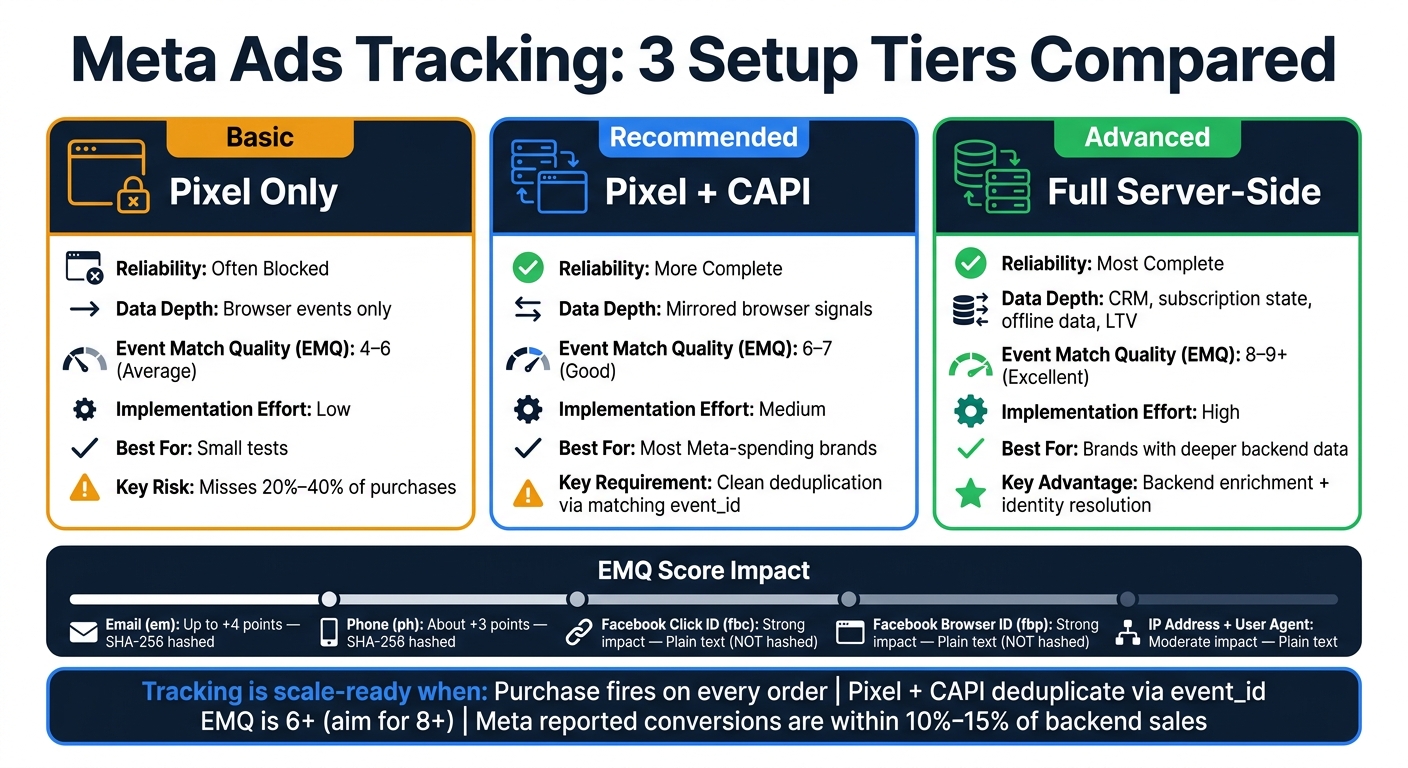
Pixel-Only vs Pixel + CAPI vs Full Server-Side Tracking for Meta Ads
When browser data starts falling apart, the fix is pretty simple: send the same purchase from both the browser and the server. The Pixel runs in the browser. CAPI is server-to-server, which means your backend sends purchase events straight to Meta and skips the browser entirely. That’s the main difference.
I use both at the same time. The Pixel gives fast browser-side signals. CAPI fills in the gaps when the browser misses events because of blocked scripts, stripped click IDs, or cookie limits. That’s why deduplication comes next.
How CAPI Improves Purchase Tracking
CAPI doesn’t care whether someone uses an ad blocker or has Safari’s Intelligent Tracking Prevention turned on. The purchase event fires from your backend after checkout is done. But CAPI only works when the event data, identifiers, and timing are set up correctly.
Deduplication with event_id: Why It Matters
If Pixel and CAPI both send the same purchase, Meta can read that as two events for one order unless event_name and event_id match inside a 48-hour window. When deduplication is off, Meta can double-count conversions or read performance the wrong way. And that leads to bad scaling decisions.
The fix is straightforward: create a unique event_id for each purchase and pass it to both the Pixel fbq('track') call and the CAPI server-side POST request. Then check it in Test Events. If the server event shows as deduplicated, you’re set.
Event Match Quality and the Identifiers That Matter
Event Match Quality (EMQ) is Meta’s 0–10 match score. It shows how much Meta can rely on the signal before taking action on it. For Purchase events, I want EMQ in the high 8s.
The identifiers that move that score are hashed email (em), hashed phone (ph), IP address, user agent, Facebook Browser ID (fbp), Facebook Click ID (fbc), and external_id from your own system. Hashed email can lift EMQ by up to 4 points, and hashed phone adds about 3 more. Hash email, phone, and name with SHA-256. fbp and fbc are the exceptions, so send those in plain text, never hashed. If you have an external_id in your system, send that too.
| Identifier | Impact on EMQ | Hashing Required |
|---|---|---|
Email (em) |
Up to +4 points | Yes (SHA-256) |
Phone (ph) |
About +3 points | Yes (SHA-256) |
Facebook Click ID (fbc) |
Strong | No - plain text |
Facebook Browser ID (fbp) |
Strong | No - plain text |
| IP Address + User Agent | Moderate | No |
These identifiers are what make the next layer of server-side tracking worth doing.
What Server-Side Tracking Adds Beyond Basic CAPI
Once CAPI is live, the next move is to use your backend data instead of only copying browser events.
Basic CAPI sends purchase events from your backend to Meta. But it still leans on context first picked up in the browser. Full server-side tracking goes a step further. It sends events through a server container or a custom backend, which lets you use data the browser never sees.
Backend Enrichment and Fingerprint-Level Attribution
With a full server-side setup, your server can send order value, subscription status, and CRM lifecycle state along with the purchase event. That gives Meta more to work with. Instead of optimizing around a plain conversion event, it can optimize around order value and lifecycle stage too.
Identity resolution also gets much stronger here. A full server-side setup can tie sessions and orders together with hashed email, hashed phone, external_id, and the fbp and fbc values picked up on the first page load. Browser cookies can vanish. Backend identifiers still help connect the event to the right person.
iOS 17 and 18 can strip fbclid and UTMs in Safari, Mail, and Messages, so capture the click ID on first load.
Pixel-Only vs Pixel + CAPI vs Full Server-Side Tracking: A Direct Comparison
Here’s the plain-English difference between the three setups.
| Feature | Pixel-Only | Pixel + Basic CAPI | Full Server-Side |
|---|---|---|---|
| Reliability | Often blocked | More complete | Most complete |
| Data Depth | Browser events only | Mirrored browser signals | CRM, subscription state, offline, LTV |
| Event Match Quality | 4–6 (average) | 6–7 (good) | 8–9+ (excellent) |
| Implementation Effort | Low | Medium | High |
| Best For | Testing | Most Meta-only brands | Brands with deeper backend data |
The jump from basic CAPI to full server-side is the difference between clean data and complete data. This isn’t just about nicer reporting. It changes how you make scaling calls.
If you’re spending a serious budget, the issue isn’t whether CAPI works. The issue is whether your setup pulls in enough backend data to make scaling calls with confidence. That’s why tracking comes before scaling.
Order of Operations: Fix Tracking First, Then Scale Hard
Once the signal stack is clear, the next rule is simple: don’t scale broken tracking.
If tracking is off, higher spend doesn’t buy growth. It just buys more waste.
Before I scale, I only care about one conversion event: Purchase.
At that point, the question isn’t whether tracking is installed. It’s whether the setup is clean enough to trust when spend goes up.
What Tracking Ready to Scale Looks Like Before You Raise Budget
Tracking is ready to scale when four things are true:
- Your Purchase event fires on every order
- Your Pixel and CAPI events use the same
event_id, so Meta doesn’t double-count - Purchase is your top-priority event in Aggregated Event Measurement
- Meta-reported conversions are within 10%–15% of backend sales
An EMQ of 6+ is workable. I want 8+ before I push budget hard.
A Practical Setup Path for Founders
Start with Shopify’s native Meta integration. It’s the easiest path for most founders. If you need more control, move to server-side GTM.
In the event payload, send hashed email and phone. Pass fbp and fbc in plain text.
Then test the setup like you mean it. Use Test Events to fire a live purchase. Make sure Pixel and CAPI dedupe correctly. After that, check Diagnostics for missing parameters, duplicate events, and low match quality. Once that looks clean, validate it in Meta before you touch budget.
How Better Tracking Speeds Up Creative Testing and Scaling
Clean purchase data lets me move faster.
When Meta gets accurate, deduplicated signals, it finds winning ads sooner. Cost caps also get easier to trust, because the CPA on screen lines up with actual purchases instead of a messy partial count.
I saw this at the real estate AI SaaS tool: $15,000 to $150,000 a month in six months. When the signal is clean, I don’t sit there making tiny budget tweaks. If the ad is strong enough, I’ll bump it 50%, 100%, even 200%.
FAQs
How hard is a Meta Conversions API setup to implement?
It’s not too hard, but you do need some technical know-how, especially if you go past the built-in platform options.
With Shopify or WooCommerce, setup is usually pretty simple. In most cases, you can use native integrations or a plugin and get up and running without much trouble.
A direct API setup is a step up. It needs server-side event sending, hashed user data, event details, and event IDs for deduplication. Pixel and CAPI should run together, and you should test everything in Meta’s Events Manager.
What breaks if Meta Pixel and CAPI aren’t deduplicated correctly?
If Meta Pixel and CAPI aren’t set up to deduplicate the same event, one conversion can get counted twice. And when that happens, reported conversions look higher than they should, which throws off ROAS.
From there, the data starts to get messy. Attribution becomes harder to trust because the numbers no longer reflect what actually happened.
When should I use full server-side tracking instead of basic CAPI?
Use full server-side tracking instead of basic CAPI when you need the most reliable, accurate tracking, especially when browser limits, ad blockers, and iOS privacy changes are cutting into browser-based signals.
It’s the better pick when you want conversions recorded more consistently, even when users opt out or browser tracking gets blocked.