Meta Ads Account Audit Checklist: 27 Things I Check Before Touching a Dollar


Before I increase Meta spend, I check 27 things in this order: ownership, tracking, campaign setup, ad quality, landing page flow, and budget controls. If your Pixel or CAPI is off, your ROAS can look better than it is. If your structure is messy, Meta can waste spend. And if your page or follow-up flow leaks, more budget just means more loss.
Here’s the short version of what matters most:
- Check account ownership first. Your brand should own the Business Manager, ad account, Pixel, domain, catalog, and payment setup.
- Fix tracking before anything else. Pixel, CAPI, deduplication, EMQ, event setup, and attribution need to line up with Shopify, GA4, Stripe, or your CRM.
- Keep campaign setup clean. Use the right objective, split prospecting from retargeting, control overlap, and avoid bad geo or placement waste.
- Review the ads themselves. Look at volume, format mix, hooks, copy, CTA fit, proof, and test rules.
- Check what happens after the click. Message match, mobile speed, checkout flow, cart recovery, lead routing, and upsells all affect CPA.
- Make sure the math works. Budget has to fit CPA, ad sets need enough volume to learn, and AOV, LTV, margin, and payback need to support more spend.
If I find 12 or more broken items, or tracking is off, I stop there and fix the base before I touch budget. That’s the whole point of this audit: find the leaks before they get expensive.
| Area | What I’m checking | What bad usually looks like |
|---|---|---|
| Account setup | BM ownership, access, billing | Old agency owns assets, weak payment setup |
| Tracking | Pixel, CAPI, EMQ, events, attribution | Duplicate purchases, weak match data, bad event mapping |
| Campaigns | Naming, objective, funnel split, overlap | Mixed intent, wrong goals, self-competition |
| Ads | Format mix, hooks, copy, proof, tests | Reused angles, weak open, no test rules |
| Funnel | Page match, mobile UX, checkout, follow-up | High CTR, low CVR, slow lead handling |
| Budget | CBO/ABO, budget-to-CPA, learning, bids | Thin spend, stuck learning, too many edits |
If you want a simple rule, use this one: fix the layer that breaks the next layer. Start with data. Then structure. Then ads. Then the page. Then budget.
Below, I break down all 27 checks in the same order I use in live accounts.
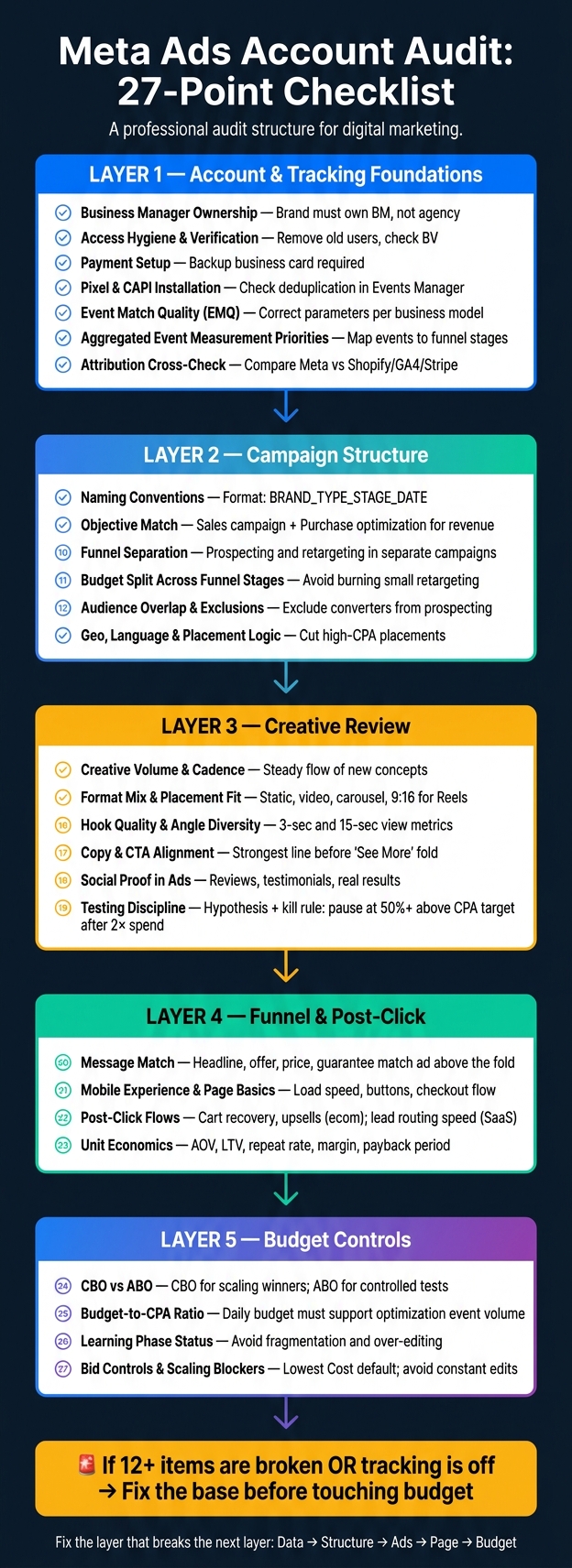
Meta Ads Account Audit: 27-Point Checklist in Order
1. Account and tracking foundations
If this part is off, every ROAS and CPA figure you’re looking at is wrong. I fix ownership and tracking before I even glance at a campaign.
Items 1–3: Business Manager, asset ownership, and payment risk
Item 1 - Business Manager ownership. Your brand should own its own Business Manager. Not your agency. Not someone’s personal profile. Every asset - ad accounts, Pages, Pixels, catalogs, and your domain - needs to sit under your BM, with the agency or freelancer added as a partner. A bad setup looks like a former agency still owning your Pixel or ad account. That creates control problems and makes handoff messy.
Item 2 - Access hygiene and verification. Open your BM’s People list and remove anyone who no longer works with you. Also check that business verification isn’t tied to a former employee’s login. Meta can restrict advertising, billing, and spend options without warning if that verification goes stale.
Item 3 - Payment setup. One failed card can shut down spend. You need a backup payment method tied to a business-owned card or corporate credit line, not someone’s personal card. If the payment profile is shaky, spend stops fast.
Items 4–5: Pixel, CAPI, and event quality
Item 4 - Pixel and CAPI installation. You want Pixel and CAPI firing cleanly. Check deduplication in Events Manager. If you’re seeing duplicate Purchase events, your ROAS gets inflated and your CPA looks lower than it is. Then Meta starts learning from bad inputs.
Item 5 - Event Match Quality (EMQ) and parameters. Your main conversion event needs to send the right parameters. For ecommerce, that usually means revenue events. For SaaS, it means qualified lifecycle events. Check EMQ inside Events Manager. If match quality is weak, Meta is trying to optimize from thin data.
Items 6–7: Event priorities and attribution cross-checks
Item 6 - Aggregated Event Measurement priorities. Each stage should map to its own event: ViewContent, AddToCart, InitiateCheckout, and Purchase. For SaaS, the map should reflect the actual lifecycle - form start, submission, MQL, SQL, and closed won. That event ladder should change based on the business model, not just the funnel stage. If a low-intent action like a newsletter signup is tracked under the same Lead event as a demo request, you’re feeding Meta the wrong signal. Get the event map lined up with the business model before you make any scaling call.
Item 7 - Attribution cross-check. This is where a lot of founders get burned. Compare Meta revenue against Shopify, GA4, Triple Whale, Hyros, or Stripe. Big gaps usually mean the data can’t be trusted. Also make sure every campaign uses the same attribution window. If windows are mixed across campaigns, performance comparisons fall apart. I don’t scale from Ads Manager alone. Once the platform data lines up with the backend, then I move into campaign structure and budget control.
2. Campaign structure and budget control
Tracking may be clean, but this is where many accounts start to fall apart: the setup works against the algorithm.
Once tracking is in place, I look at whether the account structure helps Meta spend budget well or just leaks money.
Items 8–10: Naming, objectives, and funnel separation
Item 8 - Naming conventions. I should be able to tell what a campaign is doing from the name alone. I use a fixed format: brand, campaign type, funnel stage, and date. For example: BRAND_PROS_CBO_Jun2026. When naming is messy, structure is often messy too.
Item 9 - Objective match. If you're using Traffic to get purchases because clicks look cheaper, Meta will chase clicks unless you feed it a purchase signal. If revenue is the goal, I want a Sales campaign with Purchase set as the optimization event.
Item 10 - Funnel separation. Prospecting and retargeting should live in separate campaigns. Existing customers should be excluded from prospecting. When you mix intent levels together, it gets much harder to see what's driving results.
Items 11–13: Budget split, targeting, and geo logic
Item 11 - Budget split across funnel stages. I check whether remarketing is getting more budget than the audience can handle. Small audience pools with big budgets burn out fast.
Item 12 - Audience overlap and exclusions. When ad sets overlap, the account can end up bidding against itself. That pushes CPMs up and creates waste. I also check that existing customers and recent converters are excluded from prospecting, and I flag stale lookalike seeds.
Item 13 - Geo, language, and placement logic. For U.S.-focused brands, I make sure campaigns aren't spilling into the wrong locations. Then I review placements. If Audience Network or Desktop Right Column is running with a high CPA compared to the rest of the account, I cut that placement.
Budget settings, bid controls, learning limits, and scaling blockers
These are the last levers that decide whether an account can scale or whether spend gets chopped into pieces.
Item 24 - CBO vs. ABO. CBO is my default when scaling winners. ABO is better for controlled testing, like new creative, new audiences, or a specific hypothesis. Trying to scale with ABO usually spreads spend too thin.
Item 25 - Budget-to-CPA ratio. If the daily budget is too low compared with the cost of the optimization event, delivery gets starved. And if the budget can't support enough volume, the ad set never settles down.
Item 26 - Learning phase status. If an ad set can't exit learning, it's often too fragmented or edited too often. When spend is split too thin, the ad set can get stuck in Learning Limited.
Item 27 - Bid controls and scaling blockers. Lowest Cost is my default. Cost Caps and Bid Caps make sense only when the account is already in good shape. One cost-caps campaign I ran produced $1,011,172 in revenue at a 3.90 ROAS. Constant edits are the other big blocker. Any major change to budget, bid, or creative can reset learning and throw delivery off.
If structure and controls are clean, I move to creative.
3. Creative review: what the ads are actually saying
Structure and budget can look clean on the surface. But if the creative falls flat, the rest doesn't do much.
Items 14–15: Creative volume, format mix, and rotation
Item 14 - Creative volume and cadence. I review creative concepts, not ad IDs. What I want to see is a steady flow of new ideas in rotation, so the account isn't stuck reusing the same angle again and again. If nothing new has launched lately, I flag it.
Item 15 - Format mix and placement fit. I want a real mix of static, video, carousel, and test formats. One format shouldn't do all the work. I also check for vertical-first 9:16 assets in Reels and Stories. Square assets cropped into Reels and Stories waste spend.
Once the format mix looks right, I move to the opening. It has to earn the click.
Items 16–17: Hooks, copy, and calls to action
Item 16 - Hook quality and angle diversity. I inspect the opening hard. I use 3-second views and 15-second views to see whether the opening earns attention and whether the body keeps it. That second metric - how many viewers keep watching after the first 3 seconds - helps me spot where the drop-off happens. Did the hook work, but the rest couldn't hold attention? Or was the opening too generic to pull people in at all?
Item 17 - Copy and CTA alignment. I check whether the strongest line in the primary text appears before the "See More" fold. If that line is buried, most people never even reach it. Then I look at the CTA. "Learn More" fits awareness. "Shop Now" fits when intent is already there. If the CTA and the promise point in different directions, the ad feels forced.
If the promise is right, the next step is simple: the creative needs to prove it fast.
Items 18–19: Social proof and testing process
Item 18 - Social proof inside the ads. I look for reviews, testimonials, and real customer results in the creative itself, not just on the landing page. I also keep winning social proof attached when I scale instead of starting over from zero likes and comments.
Item 19 - Testing discipline. This is where I can tell whether the account has a testing system or is just tossing things up and hoping something sticks. Real testing needs a hypothesis, a log, and a clear rule for what happens next. My kill rule is simple: pause when CPA is 50%+ above target after spending 2× the target CPA. Winners get promoted on purpose, not by accident. Every concept needs a hypothesis, a metric, and a kill-or-scale decision. That's the thinking behind ADEN'S LAB, which has generated tens of thousands of creatives.
If the creative system is weak, the landing page never gets a fair shot.
4. Funnel, conversion path, and what happens after the click
A lot of weak Meta accounts don't fail in the ad itself. They fail after the click.
If the ad did its job and earned attention, I look at the landing page next.
Items 20–21: Message match and landing page basics
Item 20 - Message match. I check whether the landing page carries forward the same promise, proof, offer, and CTA that got the click in the first place. The headline, offer, price, and guarantee should match the ad above the fold. If people land on the page and have to dig around for the thing they already said yes to, that's a scavenger hunt. And that hurts conversion.
Item 21 - Mobile experience and page basics. I check load speed, mobile usability, button function, and the checkout flow. Broken buttons can wreck sales fast. Forced account creation can do the same. If CTR looks strong but conversion looks weak, I treat that as a post-click leak. In that case, I fix the page before changing the ads.
Items 22–23: Post-click flows, AOV, and LTV economics
Once the page is converting, I look at what happens next for the lead or the cart.
Item 22 - Post-click flows. For ecommerce, I review cart recovery, browse recovery, and upsells. For SaaS, I check lead routing speed and whether CRM updates happen fast enough for quick follow-up. If a company is paying for clicks but not following up fast, ad spend just makes the leak worse.
Then I look at whether the numbers can support more spend.
Item 23 - Unit economics. AOV, repeat rate, LTV, payback, and margin tell me if I can increase spend without guessing. If those numbers aren't there, I can't tell if scaling will make money. A result can look fine in Ads Manager and still lose money.
Real account results that show why the funnel matters
The accounts that grow cleanly are the ones where tracking, creative, offer, and post-click experience all line up. the real estate AI SaaS tool is a good example: $15K to $150K/month in 6 months, with CPA dropping $8. That didn't come from pushing ads harder. It came from tightening the full system. During BFCM 2025, we moved $544,397 in 72 hours.
Conclusion: what I fix first before spend goes up
I fix tracking first. Then I move to attribution, structure, creative, funnel, and budget. If the data is off, everything that comes after turns into noise.
The simple rule is this: fix the layer that breaks the next one.
| Priority | Layer | What Fixed Looks Like |
|---|---|---|
| 1 | Tracking & Data | Pixel + CAPI are active, and duplicate events are gone. |
| 2 | Account Structure | Campaigns are consolidated, ad sets are not fragmented, and each one has enough conversion volume to learn. |
| 3 | Creative Supply | Multiple distinct visual concepts are live, and weak concepts are rotated out fast. |
| 4 | Funnel & Post-Click | Landing page CVR is healthy for the offer. |
| 5 | Budget Controls | Daily budget supports stable delivery, and bid caps only go on after CPAs are stable. |
What to do after you finish this audit
Go through all 27 items and mark each one green (healthy), yellow (weak), or red (broken). Then sort the red items by financial impact, not by what feels easiest to fix.
A couple of guardrails matter here:
- Don't judge creative until tracking is clean.
- Don't adjust bids until structure is stable.
If you've worked through this checklist and want to hand me the checklist work, I offer a $1,000 account audit where I review every layer, show you exactly what's broken, and give you a prioritized fix list. No vague recommendations.
If you'd rather talk through your specific case first, book a 30-minute strategy call - direct with me, you leave with a diagnosis either way.
For quick answers on edge cases, use the FAQ below.
Continue with a focused diagnosis
Use these guides when the next decision needs a more specific worksheet or investigation.