Facebook Ads Not Converting? 9 Reasons Your Account Is Bleeding Money

If your Meta ads get clicks but not sales, the leak is usually in your setup. In most accounts, I look at the same 9 problems first: tracking, the conversion event, account sprawl, message match, ad fatigue, page speed, attribution, narrow targeting, and split budgets.
Here’s the short version: if your EMQ is under 6.0, your Landing Page Views are 15%+ below Link Clicks, your ad sets get under 50 conversion events per week, or your cold traffic frequency is over 3.0 in 14 days, you likely have a setup problem - not a spending problem.
Before you touch budget, I’d check these in order:
- Tracking and CAPI: Meta and Shopify/CRM should line up
- Optimization event: Use the deepest event your volume can support
- Account structure: Too many ad sets can starve delivery
- Ad-to-page match: The landing page should repeat the ad promise
- Ad fatigue: Higher frequency + lower CTR + higher CPA is a bad sign
- Site speed: Slow mobile pages kill conversion
- Attribution: Compare 1-day click vs. 7-day click
- Audience size: Too narrow can hurt delivery and push up CPMs
- Budget split: Small budgets across many ad sets can keep campaigns stuck
Here’s a fast snapshot of what each issue looks like and what I’d do first:
| Problem | What I’d look for | First fix |
|---|---|---|
| Broken tracking | EMQ under 6.0 or event counts don’t match store/CRM | Fix Pixel/CAPI setup and deduplication |
| Wrong event | Optimizing for clicks or page views | Switch to Purchase, Lead, or the nearest lower event |
| Too many ad sets | Under 50 weekly conversions per ad set | Consolidate campaigns |
| Ad/page mismatch | Clicks come in, CVR stays low | Match the page headline to the ad promise |
| Ad fatigue | Frequency up, CTR down, CPA up | Swap in new angles |
| Slow page | LPVs trail clicks by 15%+ | Improve mobile load time |
| Bad attribution read | 7-day looks fine, 1-day looks weak | Use Shopify/Stripe as truth |
| Narrow audience | Small reach, rising CPMs, overlap | Broaden targeting |
| Split budget | Daily budget ÷ target CPA is under 7 | Put more spend behind fewer ad sets |
Bottom line: I’d fix the signal layer first, then structure, then targeting, then ads, then the page. If tracking is off, everything after that is guesswork.
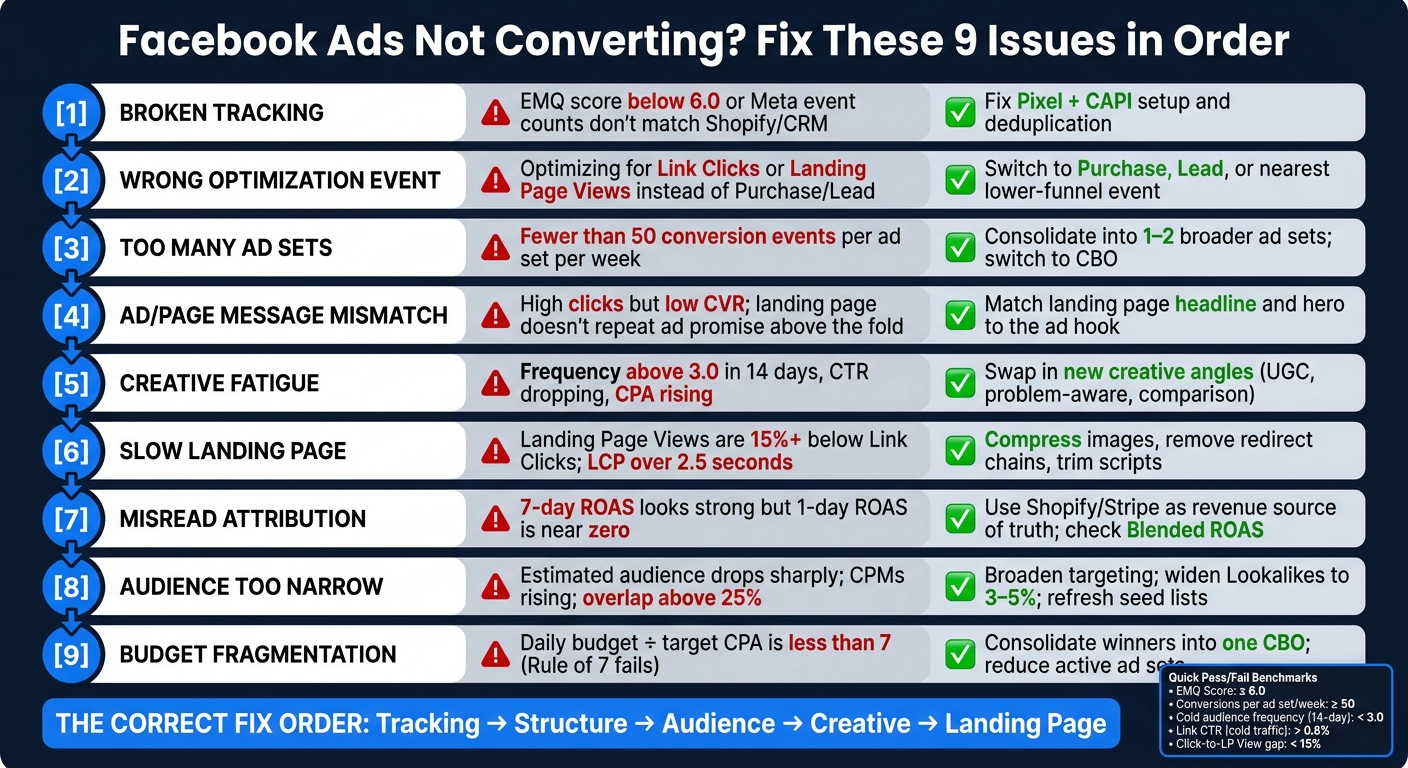
Facebook Ads Not Converting? Fix These 9 Issues in Order
1. Broken Tracking and CAPI
Broken tracking is one of the fastest ways to tank Facebook ad performance. When tracking breaks, Meta starts optimizing around signals that don't reflect actual buyers. And that means you're paying for the wrong outcomes.
A few red flags tend to show up early: low EMQ, a big gap between Link Clicks and Landing Page Views, or Purchase counts in Meta that don't match Shopify or your CRM. Another common issue is double-counting. If the browser pixel and CAPI both fire for the same purchase without the same event_id, Meta can count that one sale twice. On paper, your ROAS may look fine. In your store or pipeline, revenue stays flat.
Here’s a simple five-minute check:
- Open Events Manager and review EMQ plus deduplication for Purchase or Lead
- Compare the last 24 hours of events against Shopify orders or CRM records
If Events Manager doesn't match Shopify or your CRM, tracking is broken.
For Shopify, the easiest setup is the native Meta CAPI integration inside the Facebook & Instagram app. It takes care of deduplication and parameter sharing on its own. Also, make sure Purchase is ranked #1 in your Aggregated Event Measurement (AEM) priority list.
For SaaS, send lower-funnel CRM events like Trial Started or Demo Scheduled through server-side GTM or a webhook. One failure shows up again and again: Meta reports a high Lead count, but the CRM shows zero matched leads because external_id or hashed email (em) never made it into the CAPI payload.
This is why CAPI matters so much for iOS traffic. Bad tracking also leaves ad sets stuck in Learning Limited, because Meta never receives enough clean conversion data to learn from.
If tracking is clean and conversions still lag, the next thing to check is the optimization event Meta is using to learn.
2. Wrong Optimization Event
If tracking looks clean, the next thing to check is what Meta is trying to get you more of. This part matters a lot. Meta goes after the event you pick. So if you optimize for Traffic, it will hunt for people who click, not people who buy.
The five-minute check is pretty simple. Open the ad set and look at the optimization event. If you see Link Clicks or Landing Page Views instead of Purchases or Leads, that’s the problem. Then look at delivery status. If it says Learning Limited, the event is happening too rarely for the budget you’ve set. When the event is too rare, Meta tends to stay stuck in Learning Limited.
For ecommerce, always use Purchase. For SaaS, start with Qualified Lead or Complete Registration. If volume is too low, use Lead for a while.
One thing to watch: changing the conversion event resets learning. After you make that change, give the ad set time to relearn before you judge performance. If delivery still looks shaky, consolidate ad sets so the signal isn’t spread too thin. If the event is set right and delivery still wobbles, the next place to look is campaign and audience sprawl.
3. Too Many Campaigns and Audiences
Most accounts I audit run into the same issue: too many ad sets and not enough budget.
At first glance, more campaigns and more audience slices can feel like more control. In practice, it usually does the opposite. It spreads spend too thin, hides where money is leaking, and leaves each ad set with too little data to settle down.
A lot of founders split budget across too many interest stacks because they think tighter segmentation gives them more precision. But the outcome is pretty simple: each ad set gets starved. And when that happens, performance gets noisy.
Meta's algorithm needs roughly 50 optimization events per ad set per week to exit the learning phase. If your total weekly conversions divided by the number of active ad sets is under 50, the account is fragmented. Then the pattern starts: one ad set never settles, CPA jumps around, and no clear winner shows up.
This is one of the fastest audit checks I use. Here’s the five-minute test:
- Divide weekly conversions by active ad sets. If the number is under 50, consolidate.
- Check Audience Overlap in Ads Manager. If prospecting and retargeting overlap above 25%, those ad sets are going after the same people and muddying the signal.
The fix is usually consolidation. Merge those interest stacks into one or two broader ad sets. Then switch to CBO (Campaign Budget Optimization) so Meta can put more spend behind the audience that’s converting instead of forcing budget into weaker segments.
After that, make one change and leave the structure alone for 7 days.
The exact setup changes by business model, but the root problem stays the same: not enough signal per ad set. Ecommerce brands can often consolidate around Purchase once they have enough volume. SaaS teams usually need to optimize for Lead or Complete Registration first because volume is lower and sales cycles take longer.
| Metric | Over-Segmentation Red Flag | Healthy Benchmark |
|---|---|---|
| Weekly Events per Ad Set | < 50 conversions | 50+ conversions |
| Delivery Status | "Learning Limited" | "Active" (Learning Complete) |
| Audience Overlap | > 25% overlap | < 20% overlap |
When an account is fragmented, the next thing to check is whether the offer and the ad are speaking the same language.
4. Offer and Ad Angle Don't Match
Once the account is clean, the next place things fall apart is the promise. The ad gets clicks, but conversions don't show up because the landing page shifts the message.
Start by checking Link Clicks vs. Landing Page Views. If the gap is big, look at page speed or redirect problems first. If those numbers line up, the issue is probably the message itself.
Here's the fastest way to check: open the landing page on your phone. If the headline and hero image don't repeat the ad's promise above the fold, message match is broken. People clicked for one thing and landed on something that feels different. That's where drop-off happens.
For ecommerce, this often means sending traffic to a collection page instead of the exact product shown in the ad. For SaaS, it's usually an educational ad that sends people to a signup page without the promised resource or use case in plain sight.
| Symptom | Meaning | Fix |
|---|---|---|
| High clicks, near-zero CVR | Page doesn't match the ad hook | Repeat the ad's promise in the LP hero section |
| High clicks, high CPA from day one | Wrong angle or positioning | Test a problem-aware angle vs. a social-proof angle |
| Large Link Clicks vs. LP Views gap | Slow load or redirect friction | Check mobile load speed before adjusting the message |
| High Add-to-Cart, low Purchase | Checkout friction or mismatched expectations | Remove hidden fees; simplify checkout flow |
If the promise matches and conversion is still weak, the next thing I check is whether the creative has gone stale.
5. Creative Fatigue
If the offer lines up and the page loads fast, look at the ads next. Creative fatigue usually shows up as a higher CPA and a weaker click-through rate. A lot of people blame budget or audience first. In many cases, the ad is the issue.
Use a 14-day view and watch Frequency, Link CTR, and CPA. If frequency goes up, CTR drops, and CPA climbs, your ad signal is getting stale. It’s not just that the creative looks old. The audience has started tuning it out.
For cold audiences, two thresholds matter most: frequency above 2.5 over 7 days or above 3.0 over 14 days. Once you get past those levels, results tend to slip. Also watch your hook rate. If hook rate falls below 20%, that’s often the first warning sign, even before CPA jumps in a clear way.
Cold prospecting campaigns can wear out in 7–14 days. When that happens, don’t just swap a headline or change the thumbnail. Change the angle. That could mean going with:
- problem-aware
- UGC/social proof
- educational
- comparison-based
If you’re using Dynamic Creative Optimization and one variant is taking 90%+ of spend, the set is too concentrated. At that point, refresh the whole set. It also helps to keep 3–4 distinct angles live at once so a single ad doesn’t have to carry the account.
| Metric | Fatigue Threshold | Read |
|---|---|---|
| Frequency (7-day) | > 2.5 | Creative is overexposed |
| Frequency (14-day) | > 3.0 | Segment is likely exhausted |
| Hook Rate | < 20% | Hook has gone stale |
| Link CTR | < 0.8% | Cold CTR is too low |
If the ads still feel fresh but clicks are weak, the next place to look is landing page speed.
6. Slow Landing Pages and Site Speed Issues
If ads are still getting clicks, but sales aren't coming through, the bottleneck is usually the page.
That’s the first place I look.
The fastest check is inside Meta Ads Manager: compare Link Clicks and Landing Page Views over the same time range. If Landing Page Views are more than 15% lower than Link Clicks, people are dropping off before the page fully loads.
Then run the page through Google PageSpeed Insights and look at mobile performance. You want Largest Contentful Paint (LCP) under 2.5 seconds. Speed matters a lot here. Cold traffic has less patience, and most Meta traffic comes from mobile. So a page that feels fine on desktop can still fall apart on a phone.
The fix depends on the type of page.
For Shopify stores, the usual culprits are uncompressed product images and too many apps. Start with image compression, then do an app audit. For SaaS landing pages, the common issues are redirect chains and script bloat. Cut extra redirects, trim scripts, and use a CDN. Also, fire the Pixel early. Heavy scripts can delay the visit signal.
| Issue | Shopify Storefront | SaaS Landing Page |
|---|---|---|
| Primary bottleneck | Heavy images, too many apps | Script bloat, redirect chains |
| Fastest fix | Image compression, app audit | Remove redirects, trim scripts, use a CDN |
If Link Clicks and Landing Page Views are close, and the page loads fast, the next place to look is attribution.
7. Misreading Attribution Data
Clicks can be coming in. The page can load without a hitch. And yet the next thing that goes wrong is attribution, meaning how Meta takes credit for the sale. That’s where good campaigns get paused too soon and weak ones get more budget than they deserve.
Meta’s default 7-day click window includes assisted purchases and people who come back later to buy. On top of that, a 7-day click view can make a shaky campaign look like it’s making money.
Here’s the fast five-minute check. Open Ads Manager Reports, use Breakdown, and compare the 1-day click column with the 7-day click column. If 7-day ROAS looks strong but 1-day ROAS is close to zero, Meta is likely taking credit for sales that came from organic traffic or returning visitors instead.
For revenue, treat Shopify or Stripe as the source of truth. If Event Match Quality in Events Manager is weak, that’s a warning sign. It usually means Meta is working with poor identity data, which makes attribution errors worse.
Use each platform for what it does best.
| Platform | Data Type | Best Used For |
|---|---|---|
| Meta Ads Manager | Modeled / attributed | Finding winning creatives and optimizing inside Meta |
| Shopify / Stripe | Hard transactional data | Source of truth for actual revenue collected |
| TripleWhale / Hyros | Multi-touch / first-party | Reconciling cross-channel journeys |
Use Blended ROAS as the profit check: total revenue divided by total ad spend across all channels. It helps cut through platform-level overclaiming.
The same report can fool you in different ways depending on the business model. Ecommerce usually reads better on a shorter click window. SaaS usually needs a longer view and a lower-funnel event like Trial Start.
If attribution is off, every budget call that comes after it is off too.
8. Audience Too Narrow or Too Specific
If tracking is clean and the event is set up right, the next thing to check is the audience pool. A lot of founders narrow targeting too much. That usually hurts delivery. When the audience is too small, Meta doesn’t get enough clean conversion data to settle delivery. CPMs go up, and performance starts bouncing around.
The five-minute check: Open the ad set settings and look at Estimated Audience Size. If you see a sharp drop compared with your usual prospecting set, Meta is simply reaching fewer people.
When the audience is too tight, the ad creative has to do extra work to sort people out. That’s usually backwards. Go broader. In most accounts, broad targeting - age, gender, and location only - beats detailed stacks of interests. I’d rather let the creative do the qualifying.
If Lookalikes aren’t working, widen them from 1% to 3% or 5%. Or rebuild the seed list using verified purchasers from the last 60 to 90 days.
The fix also depends on the business model. In ecommerce, Advantage+ Shopping Campaigns handle most of the targeting on their own. I usually keep the Existing Customer Budget Cap at 20% to 30% so Meta keeps prospecting. In SaaS, Value Rules help keep broad targeting from going after low-quality leads.
| Metric | Red Flag | Action |
|---|---|---|
| Frequency (Cold, 14-day) | > 3.0 | Widen targeting or refresh the angle |
| Audience estimate | Sharp drop vs. your usual prospecting set | Refresh seed lists or remove deprecated interests |
| Audience Overlap | > 25% | Consolidate ad sets, add explicit exclusions |
9. Budget Split Across Too Many Campaigns
Once tracking is clean and your event setup makes sense, the next leak to check is budget fragmentation.
I see this all the time. An account has 10 active ad sets, each spending $50/day, and every one is set to optimize for Purchase at a $35 CPA. On paper, that might look fine. In practice, it falls apart. Each ad set is stuck in Learning Limited because it doesn't get enough volume to learn. At $50/day with a $35 CPA, you're looking at about 1.4 purchases per day, or roughly 10 per week. That's not much room for Meta to settle down, so CPA starts bouncing all over the place.
The five-minute check: use the Rule of 7: daily budget ÷ target CPA. If that number is less than 7, the ad set is underpowered. Then look at the Delivery column in Ads Manager. If several ad sets show Learning Limited, fragmentation is likely the issue.
The fix is pretty simple: run fewer ad sets and put more budget behind each one. Move your winners into one CBO campaign and let Meta allocate spend. The point isn't to have fewer campaigns just for the sake of it. The point is to give each campaign enough conversions for Meta to learn.
Frequent edits make this worse. Budget changes above 20%, audience swaps, adding new ads, and pausing or turning creatives back on can all reset learning. In a fragmented account, that means the system never gets a clean stretch of data.
The right setup also depends on the business model. Ecommerce brands often have enough purchase volume to optimize for Purchase right away, but only when the budget can support that choice. SaaS and other low-volume accounts usually do better optimizing for Lead or Complete Registration so the system has enough data to work with.
Use the table below to tell the difference between a budget issue and a signal issue.
| Diagnostic Check | Red Flag | Fix |
|---|---|---|
| Delivery Status | Learning Limited on multiple ad sets | Consolidate into fewer ad sets or one CBO |
| Rule of 7 (Daily Budget ÷ Target CPA) | Result < 7 | Increase budget or optimize for a higher-funnel event |
| Conversion Density (Weekly Conversions ÷ Active Ad Sets) | Average < 50 | Reduce active ad sets |
| Edit Frequency | Frequent budget changes, audience tweaks, or new ads | Batch edits every 3–7 days to protect learning |
Wrong Signal vs. Right Signal: Quick Reference Table
Meta gives you more of the action you ask it to find. If you optimize for clicks, it finds clickers. If you optimize for page views, it finds people who browse. I run into this across ecommerce and SaaS accounts all the time.
This is one of the fastest ways to spot a signal mismatch in an audit.
| Goal | Wrong Optimization | Correct Optimization | Wrong-Signal Outcome |
|---|---|---|---|
| Ecommerce Purchase | Traffic or Link Clicks | Purchase | High CTR, little or no sales. Meta optimizes for clickers, not buyers. |
| Ecommerce Lead Capture | Landing Page Views | Lead or Complete Registration | High page traffic, no form completions. Low-intent visitors. |
| SaaS Free Trial | ViewContent | Start Trial | Pricing views rise, account creations stay flat. |
| SaaS Demo Booked | Lead | Book Demo or Submit Application | Leads rise, bookings do not. |
If your bottom-funnel event doesn’t happen often enough, move one step up the funnel and optimize there until you have enough volume to support the actual goal.
When the wrong signal appears, it often shows up alongside broken tracking, over-segmentation, or both. If EMQ is weak, fix tracking first. These issues tend to cluster, not show up one by one.
Why These Nine Problems Usually Show Up Together
In almost every audit I run, an account usually isn’t failing because of just one issue. It’s more like death by a thousand cuts. Small mistakes pile up, and before long, performance slips in a big way. That’s why I fix things in the same sequence every time.
Once one part breaks, the rest tends to follow. Broken tracking gives Meta incomplete data, which means the system starts learning from bad signals. From there, delivery gets shaky and never quite settles down.
These nine problems usually stack on top of each other instead of showing up one at a time. And when the diagnosis is off, the fix is off too. High CPA gets pinned on creative, new ads get swapped in, and then learning resets all over again. I’ve seen founders burn through creative after creative without ever checking event match quality. If EMQ is weak, Meta is optimizing on incomplete signals.
I saw this at the real estate AI SaaS tool: fixing tracking, consolidation, and tracking quality came before scale. More budget just scales the leak.
Follow the order: tracking → structure → audience → creative → landing page. Use the quick reference table below to separate the wrong signal from the right one.
Run These Checks Before You Touch Budget Again
Before you change budget, run these five checks in this order: tracking, structure, audience, creative, and destination. I fix the signal first. Then I look at spend.
Here’s the fast five-step check:
- Check your Event Match Quality score in Events Manager. Aim for 6.0 or higher.
- Look at conversions per ad set per week. Aim for 50 or more.
- Pull your cold audience frequency over the last 14 days. Keep it below 3.0.
- Check Link CTR on cold traffic. Aim for above 0.8%.
- Compare Link Clicks and Landing Page Views. If the gap is over 15%, people are dropping off before the page fully loads.
| Checkpoint | What to Look At | Pass Threshold |
|---|---|---|
| Tracking | EMQ Score | ≥ 6.0 |
| Structure | Conversions per ad set / week | ≥ 50 |
| Audience | Frequency (cold, 14-day window) | < 3.0 |
| Creative | Link CTR on cold traffic | > 0.8% |
| Destination | Click-to-LP View gap | < 15% |
If step one fails, stop there. Fix it before you move to the next layer. Fix tracking first. Creative can’t solve bad data.
If these checks still don’t explain the drop, the FAQ below covers the common edge cases.
FAQ
If the nine checks still don't explain the drop, these are the edge cases I see most often.
Why are my Facebook ads getting clicks but no sales?
Clicks without sales usually point to one of three problems: the wrong objective, broken tracking, or a weak match between the ad and the landing page. Start with tracking. Then switch to the conversion objective. After that, make sure the landing page repeats the ad's promise above the fold.
If that still doesn't explain it, go back and double-check tracking.
How do I know if Pixel or CAPI is broken?
Open Events Manager and look at two things.
- Your Event Match Quality (EMQ) score. An EMQ below 6.0 is a warning sign.
- Your Purchase event count in the last 24 hours compared with your actual orders. If those numbers don't line up, the tracking connection is broken.
Should I optimize Facebook ads for clicks or conversions?
Optimize for the deepest conversion event your volume can support. The Traffic objective tells Meta to find people who click, not people who buy.
How much budget do Facebook ads need to convert?
Your budget needs to support enough weekly conversion volume for learning. If it doesn't, the account starts to fragment and CPA gets noisy. In that case, consolidate ad sets or optimize one step higher in the funnel.
Why are my Facebook ads converting less than before?
One common cause is creative fatigue. When frequency goes up, CTR goes down, and CPA climbs over a 7–14 day window, your audience has seen the ads too many times.
Another common cause is a page change that broke tracking. Check your EMQ score before assuming the platform changed.
Can a bad landing page cause Facebook ads to fail?
Yes. A slow or mismatched landing page can sink a good ad fast. If Landing Page Views trail Link Clicks by more than 15%, fix the page before changing the creative or budget.
Conclusion
The answer usually isn’t buying more ads. Start by finding the leak, in order.
These problems tend to stack on top of each other. Fix the signal first. Then look at structure, creative, and page speed. Most poor results can be traced back to one of those layers, and the right fix starts with the first one that’s broken.
If the source of the leak still isn’t clear, the FAQ below covers the edge cases.